


How to Use AI Image Generation to Reimagine Any Real Estate Investment
Updated: Nov 25, 2025
AI has officially become one of my favorite real estate superpowers — and if you’re not using it yet, you’re missing out on a massive opportunity to move faster, make smarter decisions, and present your vision with clarity and confidence.
When you’re trying to maximize a property’s value (or help a partner, lender, tenant, or buyer understand what YOU see), clear visuals can change everything. Instead of waiting weeks for staging, renovations, or design mock-ups, AI lets you create the vision in minutes.
You don’t need design skills.
You don’t need tech skills.
You just need a photo and a solid prompt.
Here are 5 powerful ways you can use AI image generation in your real estate business right now.
1. Stage and Style Short-Term Rentals Before You Buy Any Furniture
Want to see your future Airbnb in “modern boho,” “organic luxe,” or “cozy cabin” style?
AI staging makes that possible instantly.
Upload a photo of the empty room → ask AI to stage it → boom, multiple design directions to choose from.
This helps you compare aesthetics, refine your strategy, and pick the look that attracts the guests you want.
Prompt idea:
“Furnish this empty living room as a short-term rental with modern boho style, rattan furniture, neutral tones, and layered textures.”
Tools to try: RoomGPT, ChatGPT with DALL·E, REimagine Home
2. Reimagine the Curb Appeal of Your Next Flip
Curb appeal sells. And AI lets you run endless exterior design tests without lifting a paintbrush.
Experiment with:
• new paint colors
• landscaping options
• siding materials
• porch styles
• windows and trim
You can also use these images to align with partners, show lenders your vision, or help a potential buyer understand the property’s potential.
Prompt idea:
“Redesign this home’s exterior with white board-and-batten siding, black window trim, a natural wood front door, and drought-tolerant landscaping.”
Tools: Exterior AI, Remodeled.AI
3. Design Retail or Office Spaces for Potential Tenants
Here’s where AI becomes incredibly powerful.
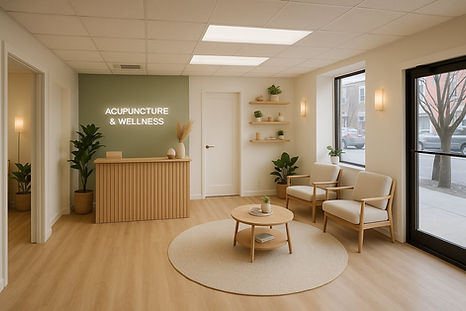
I recently helped a potential tenant — a wellness practitioner — visualize her business inside one of my vacant retail units. I uploaded photos of the space into ChatGPT and Gemini and asked both tools to generate design concepts.
The results were honestly stunning.
It helped us align quickly, gave her confidence in the space, and made the vision feel real long before renovations started.
Tip:
Use the same prompt in multiple tools and compare the results — each platform will interpret the space differently.
4. Market Pre-Construction or “Coming Soon” Listings with Professional-Looking Visuals
If the property isn’t photo-ready, AI can help you create:
• staged interiors
• exterior renderings
• styled rooms
• visuals for listings, flyers, presentations, and investor decks
Buyers and tenants connect faster when they can see what’s coming, not just read about it.
5. Test Renovation Ideas Before Spending a Dime
Before making costly decisions, AI can help you explore:
• kitchen layouts
• cabinet styles
• bathroom tile patterns
• flooring choices
• lighting schemes
• color palettes
This prevents expensive mistakes, speeds up decision-making, and gives your contractor a visual guide so nothing gets lost in translation.
How to Get Started (It’s Seriously Easy)
All you need is:
A clear photo of the space
A detailed prompt describing style, colors, vibe, and purpose
An AI tool: ChatGPT, Gemini, RoomGPT, Midjourney
AI isn’t here to replace us — it’s here to amplify us.
In real estate, we’re constantly selling a vision: to ourselves, our teams, our lenders, and our buyers or renters. AI lets you present that vision instantly and beautifully, long before any physical work begins.
If you start integrating visual AI tools now, you’ll move faster, make more confident decisions, and position yourself at the forefront of the industry’s next big leap.


Comments